WebCatalog Review
Do you know WebCatalog Review, if yes then this article is for you. We are discussing about it here. Read more.
If you use multiple web applications every day, switching between browser tabs can become frustrating. Whether you’re managing Gmail, Slack, WhatsApp, Notion, Trello, ChatGPT, or Microsoft Teams, keeping everything organized is a challenge. That’s where WebCatalog comes in.
WebCatalog is a desktop application that allows users to install web apps as standalone desktop applications. Instead of opening dozens of browser tabs, you can run each web app independently with its own notifications, cookies, sessions, and settings.
In this detailed WebCatalog Review 2026, we’ll explore its features, pricing, advantages, disadvantages, security, supported platforms, and whether it’s worth downloading.

What Is WebCatalog?
WebCatalog is a desktop productivity tool that lets you transform your favorite websites into native desktop applications.
Unlike traditional browsers, WebCatalog isolates every app into its own environment. This means Gmail won’t share cookies with Facebook, and Slack won’t interfere with your Microsoft Teams session.
It works similarly to native desktop software while still using the web version of the service.
Whether you’re a freelancer, student, remote employee, or business owner, WebCatalog helps reduce browser clutter and improve productivity.
How Does WebCatalog Work?
WebCatalog creates a separate desktop container for each web application.
Instead of opening:
- Gmail in Chrome
- Slack in Edge
- WhatsApp in Firefox
You can launch each app directly from your desktop just like normal software.
Every app includes:
- Separate login sessions
- Independent cookies
- Individual notifications
- Custom permissions
- Dedicated storage
This separation improves organization and security.
Key Features of WebCatalog
1. Install Thousands of Web Apps
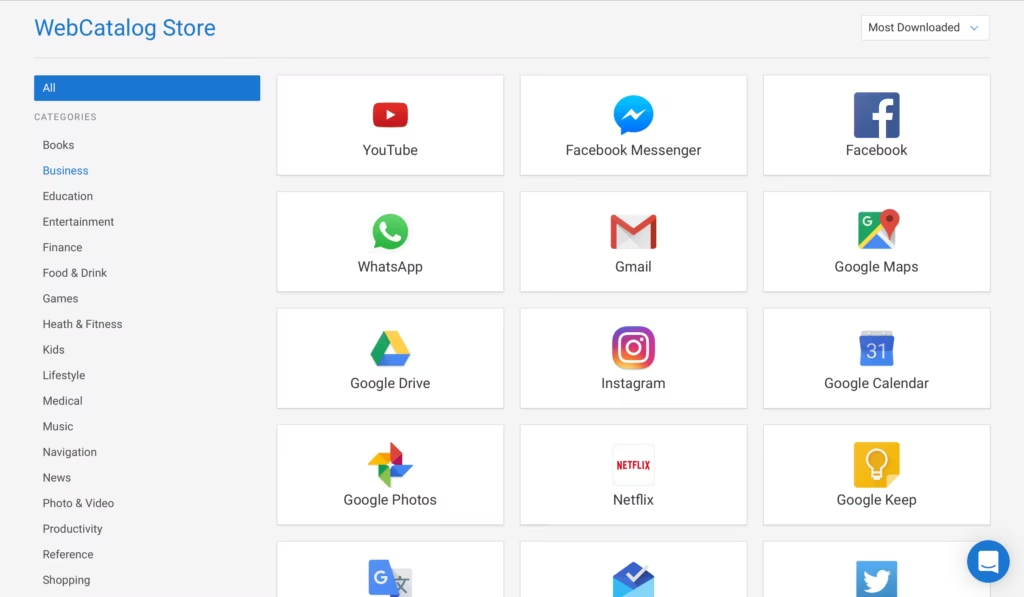
WebCatalog includes an extensive catalog featuring thousands of popular web applications.
Popular apps include:
- Gmail
- ChatGPT
- Discord
- Trello
- Zoom
- Microsoft Teams
- Canva
- Notion
- Google Drive
- Dropbox
- Spotify
- X (Twitter)
You can install most apps with one click.
2. Spaces
One of WebCatalog’s standout features is Spaces.
Spaces allow users to create separate work environments.
For example:
Personal Space
- Gmail Personal
- YouTube
Work Space
- Slack
- Microsoft Teams
- Jira
- Notion
- Zoom
This makes switching between work and personal accounts incredibly easy.
3. Multiple Accounts
Need two Gmail accounts?
Three WhatsApp accounts?
Two Discord profiles?
WebCatalog supports multiple instances of the same application.
Each account remains completely isolated.
4. Native Notifications
Unlike browser notifications that often disappear among dozens of tabs, WebCatalog delivers dedicated desktop notifications.
Benefits include:
- Faster alerts
- Better notification management
- Separate notification settings
- Less distraction
5. Browser Extensions Support
Many Chromium extensions can also work inside WebCatalog.
Examples include:
- Password managers
- Ad blockers
- Grammar checkers
- Productivity tools
6. Privacy Controls
Privacy is another major advantage.
Users can:
- Block trackers
- Clear cookies
- Remove cache
- Control permissions
- Restrict camera access
- Disable microphone access
7. Cross-Platform Compatibility
WebCatalog supports:
- Windows
- macOS
- Linux
This makes it useful regardless of your operating system.
Benefits of Using WebCatalog
Better Productivity
No more searching through dozens of browser tabs.
Every app opens instantly.
Reduced RAM Usage
While browsers can consume significant memory with many tabs open, isolated apps often feel easier to manage.
Cleaner Desktop Experience
Applications appear like native software.
You can:
- Pin apps to taskbar
- Launch from Start Menu
- Add desktop shortcuts
Better Account Management
Managing multiple business accounts becomes much simpler.
Perfect for:
- Digital marketers
- SEO professionals
- Social media managers
- Customer support teams
Improved Focus
Without unnecessary browser tabs, users remain focused on current tasks.
WebCatalog Pricing
WebCatalog offers both Free and Pro plans.
Free Version
Includes:
- Install web apps
- Basic app management
- Standard features
Suitable for casual users.
Pro Version
Includes:
- Unlimited Spaces
- Premium customization
- Advanced privacy controls
- More productivity features
- Better account management
For professionals handling multiple workflows, the Pro version can provide additional flexibility.
Supported Applications
WebCatalog supports thousands of applications, including:
Communication
- Slack
- Discord
- Telegram
- Messenger
Productivity
- Notion
- ClickUp
- Trello
- Asana
- Monday.com
AI
- ChatGPT
- Claude
- Perplexity
- Gemini
Office
- Google Docs
- Google Sheets
- Microsoft Office
- Outlook
Development
- GitHub
- GitLab
- Jira
- Linear
Design
- Canva
- Figma
Is WebCatalog Safe?
Yes.
WebCatalog is generally considered safe when downloaded from its official website.
Security features include:
- Sandboxed applications
- Cookie isolation
- Permission management
- Privacy controls
- Secure authentication
However, users should always:
- Download from the official website.
- Keep the software updated.
- Enable two-factor authentication for supported services.
- Use a trusted password manager.
WebCatalog Pros and Cons
Pros
- Easy installation
- Thousands of supported apps
- Excellent organization
- Multiple account support
- Cross-platform
- Separate notifications
- Privacy-focused
- Clean interface
Cons
- Some advanced features require Pro.
- Still depends on web versions of apps.
- A few apps may have limited functionality compared to native desktop software.
Who Should Use WebCatalog?
WebCatalog is ideal for:
- SEO professionals
- Bloggers
- Affiliate marketers
- Students
- Developers
- Freelancers
- Remote workers
- Business teams
- Virtual assistants
- Agencies
If your work revolves around multiple online services, WebCatalog can simplify your workflow.
WebCatalog vs Traditional Browser
| Feature | WebCatalog | Browser |
|---|---|---|
| Separate Apps | ✅ | ❌ |
| Multiple Accounts | ✅ | Limited |
| Spaces | ✅ | ❌ |
| Desktop Integration | ✅ | Limited |
| Better Organization | ✅ | ❌ |
| Independent Notifications | ✅ | Limited |
| Privacy Isolation | ✅ | Limited |
Tips for Getting Started
To make the most of WebCatalog:
- Install only the apps you use daily.
- Create separate Spaces for work and personal tasks.
- Enable desktop notifications only for important apps.
- Use multiple profiles for different accounts.
- Regularly update the application.
- Remove unused apps to keep your workspace organized.
Frequently Asked Questions
Is WebCatalog free?
Yes. A free version is available, along with a Pro plan that unlocks additional productivity features.
Can I use multiple Gmail accounts?
Yes. WebCatalog allows multiple isolated instances of the same app, making it easy to manage several Gmail accounts.
Does WebCatalog work on Windows?
Yes. It supports Windows, macOS, and Linux.
Is WebCatalog better than using Chrome?
For users who juggle many web apps, WebCatalog offers better organization through isolated apps, dedicated notifications, and Spaces. For general web browsing, a traditional browser remains essential.
Can I install ChatGPT in WebCatalog?
Yes. ChatGPT and many other popular AI tools can be installed as standalone desktop apps.
Also Read About CometChat Review: Build Real-Time Chat Apps Faster
Conclusion
WebCatalog is an excellent solution for anyone who relies heavily on web applications. By turning websites into standalone desktop apps, it helps reduce browser clutter, organize workflows, and manage multiple accounts more efficiently. Features like Spaces, isolated sessions, and dedicated notifications make it especially valuable for professionals, remote workers, and students.
While the free version is sufficient for many users, those who need advanced workspace management and productivity features may find the Pro plan worthwhile. If you spend much of your day switching between online tools, WebCatalog is definitely worth trying.