QuillBot Review
AI writing tools have completely changed how people create content. QuillBot review From students and bloggers to freelancers and professionals, many now rely on writing assistants to save time and improve clarity.
One of the most popular tools in this space is QuillBot.
QuillBot claims to enhance your writing, improve fluency, fix grammar errors, summarize long content, and even check for plagiarism. But does it actually deliver on those promises?
In this honest and detailed QuillBot review, we’ll cover:
- What QuillBot is
- How it works
- Its main features
- Pros and cons
- Pricing plans
- Comparisons with alternatives
- Whether it’s worth using in 2026
What Is QuillBot?

QuillBot is an AI-powered paraphrasing and writing assistant designed to rewrite text while keeping the original meaning intact.
It is commonly used by:
- Students rewriting essays
- Bloggers improving drafts
- Content creators restructuring articles
- Non-native English speakers enhancing clarity
- Professionals refining emails and reports
The platform operates on a freemium model. You can access basic features for free, but advanced tools and unlimited word limits require a paid subscription.
At its core, QuillBot focuses on one main function: paraphrasing content using AI.
Continue Reading – Google Veo 3.1 AI Video Generator: Complete Guide
How Does QuillBot Work?

QuillBot uses Natural Language Processing (NLP) and transformer-based AI models to analyze text and generate rewritten versions.
Here’s how it works step-by-step:
- You paste your text into the editor.
- The AI analyzes sentence structure and context.
- It identifies key phrases and word relationships.
- It replaces words with suitable synonyms.
- It restructures sentences depending on the selected writing mode.
- It generates a revised version of your content.
The underlying technology is similar to modern AI tools like ChatGPT, but QuillBot is specifically optimized for rewriting rather than long-form content creation.
Key Features of QuillBot

Let’s explore QuillBot’s most important features.
1. Paraphrasing Tool (Core Feature)
The paraphraser is QuillBot’s main selling point.
It offers multiple writing modes:
- Standard Mode
- Fluency Mode
- Formal Mode
- Simple Mode
- Creative Mode
- Expand Mode
- Shorten Mode
Users can also adjust the synonym slider to control how different the rewritten text is from the original.
Performance Insight:
It works well for improving awkward sentences and making minor clarity adjustments. QuillBot review However, aggressive paraphrasing can sometimes make text sound robotic or overly complex.
2. Summarizer
The summarizer condenses long paragraphs into shorter summaries.
It is useful for:
- Study notes
- Research material
- Article overviews
- Quick content scanning
While effective for factual content, it may oversimplify nuanced or opinion-based writing.
3. Grammar Checker
QuillBot includes a built-in grammar correction tool that detects:
- Spelling errors
- Punctuation mistakes
- Basic grammar issues
It functions similarly to Grammarly, though Grammarly may offer more advanced tone and clarity suggestions.
4. Plagiarism Checker
Available in premium plans, this feature scans text against online sources to detect duplicate content.
This can be particularly useful for students and academic writers submitting assignments.
However, no plagiarism checker guarantees 100% accuracy.
5. Citation Generator
QuillBot provides a citation tool that generates references in formats such as:
- APA
- MLA
- Chicago
Helpful for academic projects and research papers.
6. Translator
The translation feature converts text into multiple languages. While convenient, it may not replace professional translation services for complex documents.
My Honest Experience Using QuillBot
After testing QuillBot on different types of content — blog posts, academic writing, and creative text — here’s what stood out:
Academic Content
Performs fairly well. Structured and formal writing benefits from minor adjustments.
Blog Drafts
Can improve clarity in rough drafts and fix awkward phrasing.
Creative Writing
This is where it struggles. Emotional tone and personal voice often get diluted.
One key issue is that QuillBot sometimes removes writing personality. QuillBot review Writing isn’t just about word choice — it’s about voice, rhythm, and intention. Heavy paraphrasing can reduce originality.
More Helpful Resources – Fastmail Review: Private Email Made Simple
Pros of QuillBot
User-friendly interface
Fast rewriting results
Multiple writing modes
Useful summarizer
Helpful for ESL writers
Clean and simple dashboard
Cons of QuillBot
Text can sound robotic
Overuse of synonyms
Slight meaning shifts in some outputs
Premium pricing may feel high
Not ideal for persuasive or storytelling content
QuillBot vs Other Writing Tools
QuillBot vs ChatGPT
Compared to ChatGPT:
- ChatGPT offers more flexibility and customization.
- It can generate full articles from scratch.
- It allows tone and style instructions.
QuillBot is better for quick sentence-level rewrites.
ChatGPT is better for creative and long-form writing.
QuillBot vs Grammarly
Compared to Grammarly:
- Grammarly focuses on correcting and improving existing writing.
- QuillBot focuses on rewriting entire sentences.
If your goal is editing and polishing, Grammarly may be stronger.
If you want to restructure text quickly, QuillBot can help.
Is QuillBot Good for SEO?
Many bloggers use paraphrasing tools hoping to create “unique” content for search engines.
However, modern SEO prioritizes:
- Original insights
- Experience-based content
- Depth and expertise
- User satisfaction
Simply rewriting existing content does not guarantee better rankings.
QuillBot can help refine drafts, but SEO success depends on adding real value — not just changing words.
QuillBot Pricing (2026)
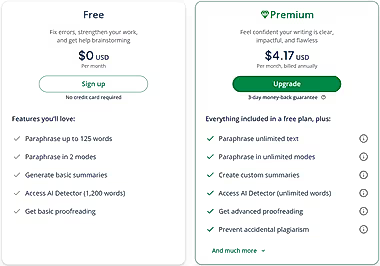
Free Plan
- 125-word paraphrasing limit
- Limited writing modes
- Basic features
Premium Plan
- Around $8–$20 per month (depending on billing cycle)
- Unlimited word usage
- All writing modes
- Plagiarism checker
- Faster processing
- Higher summarizer limits
For occasional use, the free plan may be enough. Frequent academic or professional users may benefit from premium access.
Also read bout – Gusto Payroll: Honest Review
Frequently Asked Questions (FAQs)
1. Is QuillBot free to use?
Yes, QuillBot offers a free version with limited features. Premium plans unlock advanced modes and unlimited usage.
2. Is QuillBot better than ChatGPT?
It depends on your needs. ChatGPT offers more flexibility, while QuillBot specializes in fast paraphrasing.
3. Does QuillBot remove plagiarism?
It rewrites text and may reduce similarity, but it does not guarantee complete plagiarism removal.
4. Is QuillBot good for students?
It can help simplify and refine writing, but students should still create original work and cite sources properly.
5. Is QuillBot worth paying for?
It may be worth it for frequent users who need unlimited paraphrasing and plagiarism checks. Casual users may prefer the free version.
Final Verdict: Is QuillBot Worth It?
QuillBot does what it promises — it rewrites text using AI.
It’s not revolutionary, but it is functional.
If used responsibly, it can:
✔ Save editing time
✔ Improve clarity
✔ Simplify complex writing
However, it cannot replace creativity, originality, or deep expertise.